
Download VivoChat – AI Chatbot for Websites, Free & Secure
Overview & Why VivoChat Matters for Modern Websites
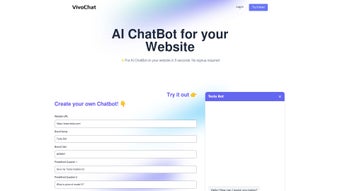
In an era where instant communication defines brand perception, VivoChat emerges as a powerful AI‑driven chatbot designed to turn passive visitors into active participants. Unlike traditional contact‑form solutions, VivoChat integrates directly into any website without the need for user sign‑ups, making the onboarding process frictionless for both businesses and their audiences. The platform’s core promise is simple yet profound: boost visitor engagement, capture valuable leads, and provide round‑the‑clock support through intelligent, multilingual conversations.
What sets VivoChat apart is its focus on data‑driven insights. Every interaction is stored in a searchable chat history, enabling website owners to analyze visitor intent, spot recurring questions, and refine their messaging strategy. This analytical layer turns a simple chat window into a strategic asset that can drive conversion rate optimization and improve overall customer satisfaction.
Moreover, the tool’s email‑collection capability works organically. By prompting visitors with contextual questions, the chatbot gathers contact information without the intrusive pop‑ups that often deter users. The result is a higher quality lead list that is already primed for further nurturing. With support for more than 95 languages, VivoChat ensures that businesses can serve a truly global audience, breaking down language barriers that previously limited engagement.
From startups looking for a cost‑effective engagement boost to established enterprises needing robust analytics, VivoChat’s flexible pricing—including a free trial with generous messaging limits—caters to a wide spectrum of needs. Its API access also means developers can extend functionality, integrate with CRM systems, or embed custom workflows, making it a versatile addition to any tech stack.
Feature Deep Dive: How VivoChat Supercharges Interaction
Core Functionalities
- AI‑powered natural language understanding for context‑aware replies.
- Predefined question templates that enable rapid chatbot creation.
- Seamless embed code for instant integration on any website platform.
- Chat history archive with searchable analytics dashboard.
- Email capture through conversational prompts, boosting lead quality.
- Multilingual support covering over 95 languages and dialects.
- Customizable branding options to match your site’s look and feel.
- Free trial tier with daily messaging caps and basic customization.
- Premium plans offering advanced analytics, unlimited chats, and priority support.
- Robust API for developers to connect with CRM, marketing automation, or custom back‑ends.
Each feature is built with usability in mind. The predefined question library removes the need for coding expertise, allowing marketers to craft conversational flows within minutes. Meanwhile, the AI engine continuously learns from interactions, improving response relevance over time. This adaptability ensures that even as product offerings evolve, the chatbot stays aligned with visitor expectations.
Analytics are a standout component. The dashboard visualizes metrics such as conversation length, drop‑off points, and frequently asked questions. By translating raw chat logs into actionable insights, businesses can fine‑tune their FAQs, optimize product pages, and identify new content opportunities. The ability to segment data by language or visitor source further refines targeting strategies.
From a conversion perspective, the email capture mechanism integrates directly with popular email‑marketing platforms, enabling automated follow‑up sequences. Because the data is gathered conversationally, users are more likely to provide accurate information, leading to higher deliverability rates and better campaign performance.
Finally, the API opens doors for deeper integration. Whether you need to push chat transcripts into a ticketing system, trigger push notifications, or synchronize user data with a loyalty program, the API provides the flexibility required by modern, omnichannel businesses.
Installation, Configuration & Compatibility Guide
Step‑by‑Step Installation
Getting VivoChat up and running is intentionally straightforward. Follow these steps to embed the chatbot on your website:
- Create an account (optional) – While a sign‑up isn’t mandatory for basic use, registering unlocks the free trial dashboard where you can monitor chat volume and adjust settings.
- Choose a template – Browse the library of predefined question sets (e.g., product inquiry, support, newsletter sign‑up) and select the one that matches your goal.
- Customize the conversation flow – Use the drag‑and‑drop builder to add, reorder, or edit questions. You can also set conditional logic to guide users based on previous answers.
- Brand the widget – Adjust colors, logo, and greeting text to align with your site’s visual identity. This step ensures the chatbot feels like an integrated part of the user experience.
- Generate the embed code – Once satisfied, click “Generate Code.” VivoChat provides a single JavaScript snippet that you paste before the closing
tag of any HTML page. - Publish and test – Refresh your site and interact with the chatbot. Use the built‑in preview mode to verify language settings and email capture functionality.
Configuration Tips for Maximum Impact
To extract the most value, consider the following configuration best practices:
- Set clear call‑to‑action (CTA) triggers – Position the chat widget where visitors naturally seek help, such as product pages or checkout funnels.
- Leverage multilingual auto‑detect – Enable language detection so the bot greets users in their native tongue, reducing friction and increasing engagement.
- Integrate with your email platform – Connect the email capture field to Mailchimp, HubSpot, or your preferred ESP to automate lead nurturing.
- Monitor analytics daily – Use the chat history dashboard to spot trends early and adjust conversation scripts accordingly.
- Utilize the API for advanced workflows – If you have a CRM, push chat transcripts via the API to create support tickets automatically.
Compatibility (itemprop="operatingSystem")
VivoChat is a web‑based solution, which means it works across all major operating systems and browsers. Whether your visitors are on Windows, macOS, Linux, Android, or iOS, the chatbot renders consistently because it relies on standard HTML5, CSS3, and JavaScript. Tested browsers include Chrome, Firefox, Safari, Edge, and Opera. The responsive design adapts to desktop monitors, tablets, and mobile screens, ensuring a seamless experience regardless of device.
Pros, Cons, Frequently Asked Questions & Final Verdict
Pros
- Easy, no‑code setup – launch a functional chatbot in minutes.
- Robust multilingual support (95+ languages) expands global reach.
- Chat history analytics provide actionable insights for marketing and support.
- Built‑in email capture improves lead quality without intrusive pop‑ups.
- Free trial with generous limits allows risk‑free evaluation.
- API access enables deep integration with existing systems.
Cons
- Advanced customization (e.g., complex conditional logic) requires a premium plan.
- While the UI is intuitive, power users may find the visual builder less flexible than raw code.
- Chat history export is limited to CSV in the free tier, which may require manual handling.
FAQ – Your Common Questions Answered
Can I use VivoChat without creating an account?
Yes. VivoChat allows you to embed a basic chatbot using a generated script without signing up. However, creating an account unlocks the dashboard for analytics, customization, and access to premium features.
How does the multilingual detection work?
The AI engine automatically detects the visitor’s browser language settings and selects the appropriate language pack from the 95+ supported languages. You can also force a language manually in the settings.
Is there a limit on the number of chats in the free tier?
The free trial provides up to 500 chat interactions per month, which is sufficient for small sites or testing. Exceeding this limit prompts you to upgrade to a paid plan.
Can VivoChat integrate with my existing CRM?
Absolutely. The platform offers a RESTful API that can push conversation data, lead information, and email captures directly into popular CRMs like Salesforce, HubSpot, or a custom solution.
Is the chatbot secure and GDPR‑compliant?
VivoChat adheres to industry‑standard encryption for data in transit and at rest. The platform provides consent mechanisms and data‑deletion tools to help you meet GDPR and other privacy regulations.
Final Verdict & Call to Action
After weighing the strengths and minor limitations, VivoChat stands out as a versatile, secure, and user‑friendly AI chatbot solution for any website looking to boost engagement and capture leads. Its multilingual capabilities, analytics dashboard, and hassle‑free embed process make it especially attractive for businesses aiming to serve a global audience without investing in heavy development resources. The free trial eliminates risk, allowing you to test the impact on conversion rates before committing to a paid plan. If you’re ready to transform passive traffic into interactive conversations, download VivoChat now and start building smarter customer interactions today.



.png)



